Topic Clusters for LLMs: Hybrid Architecture for AI Search
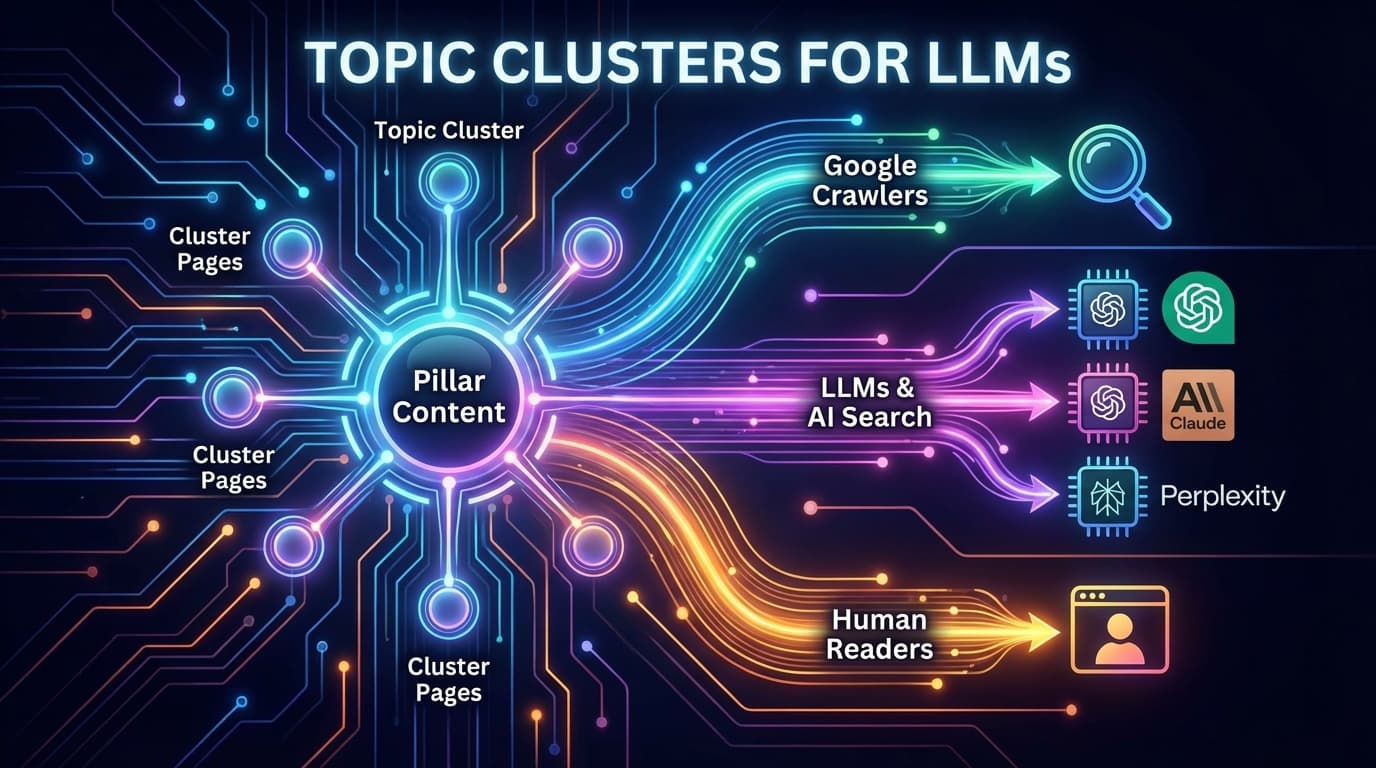
Google is no longer the only search engine that matters. ChatGPT, Claude, Perplexity, and other LLM-powered search tools are processing your content right now, and they understand structured data differently than Googlebot.
Traditional topic cluster implementations fail here. They rely on internal links alone, with no machine-readable relationship data that LLMs can parse. We built a React component that solves this: ContentCluster, a triple-layer architecture that serves Google crawlers, LLMs, and human readers simultaneously.
The Problem: Topic Clusters Without Machine-Readable Context#
Topic clusters are a proven SEO strategy. You create a pillar page that covers a broad topic, then link cluster pages that dive deep into subtopics. Google follows the internal links, understands the topical relationship, and rewards your site with authority.
But here's what most implementations miss:
LLMs don't navigate your site like Googlebot. They process page content in isolation, often through training data snapshots. Without explicit structured data declaring topic relationships, ChatGPT and Claude have no way to understand that your 15 blog posts form a cohesive content hub on "technical SEO."
Consider how these systems process your content differently:
How Different Systems Process Topic Clusters
Traditional Implementation
Hybrid Architecture
The Solution: Triple-Layer Architecture#
Our ContentCluster component implements three distinct layers, each optimized for a different consumer:
Three Layers, Three Audiences
This separation of concerns means each layer can be optimized independently. The structured data layer follows Schema.org specifications precisely, the SEO layer maximizes link equity transfer, and the UI layer prioritizes reading experience.
Implementation: The ContentCluster Component#
Here's the complete React component for Next.js:
// components/content-cluster.tsx
'use client';

import { useState, useEffect } from 'react';
import Link from 'next/link';

interface ClusterItem {
  name: string;
  url: string;
  position: number;
  description?: string;
}

interface ContentClusterProps {
  pillarPage: {
    name: string;
    url: string;
    description: string;
  };
  clusterItems: ClusterItem[];
  currentUrl: string;
}

export function ContentCluster({
  pillarPage,
  clusterItems,
  currentUrl
}: ContentClusterProps) {
  const [isScrolled, setIsScrolled] = useState(false);
  const [isExpanded, setIsExpanded] = useState(false);

  useEffect(() => {
    const handleScroll = () => {
      setIsScrolled(window.scrollY > 300);
    };
    window.addEventListener('scroll', handleScroll);
    return () => window.removeEventListener('scroll', handleScroll);
  }, []);

  // Filter out current page from cluster items
  const otherItems = clusterItems.filter(
    item => item.url !== currentUrl
  );

  // Schema.org ItemList for crawlers and LLMs
  const schemaData = {
    '@context': 'https://schema.org',
    '@type': 'ItemList',
    name: `${pillarPage.name} Topic Cluster`,
    description: pillarPage.description,
    itemListElement: [
      {
        '@type': 'ListItem',
        position: 0,
        name: pillarPage.name,
        url: pillarPage.url,
        description: 'Pillar page for this topic cluster'
      },
      ...clusterItems.map(item => ({
        '@type': 'ListItem',
        position: item.position,
        name: item.name,
        url: item.url,
        ...(item.description && { description: item.description })
      }))
    ]
  };

  return (
    <>
      {/* Layer 1: Schema.org JSON-LD for crawlers + LLMs */}
      <script
        type="application/ld+json"
        dangerouslySetInnerHTML={{
          __html: JSON.stringify(schemaData)
        }}
      />

      {/* Layer 2: sr-only navigation for link equity + accessibility */}
      <nav
        aria-label="Related content in this topic cluster"
        className="sr-only"
      >
        <h2>Related Articles on {pillarPage.name}</h2>
        <p>This article is part of our {pillarPage.name} topic cluster.</p>
        <ul>
          <li>
            <Link href={pillarPage.url}>
              {pillarPage.name} (Pillar Page)
            </Link>
          </li>
          {otherItems.map(item => (
            <li key={item.url}>
              <Link href={item.url}>{item.name}</Link>
            </li>
          ))}
        </ul>
      </nav>

      {/* Layer 3: Floating badge UI for human readers */}
      <div
        className={`
          fixed z-40 transition-all duration-300
          ${isScrolled
            ? 'bottom-4 right-4'
            : 'top-24 right-4'
          }
        `}
      >
        {isScrolled ? (
          // Collapsed badge after scroll
          <button
            onClick={() => setIsExpanded(!isExpanded)}
            className="bg-[#1e1e1e] border border-[#3e3e42] rounded-full
                       px-3 py-2 text-sm text-[#9d9d9d] hover:border-[#4fc1ff]
                       flex items-center gap-2 shadow-lg"
          >
            <span className="w-2 h-2 bg-[#4fc1ff] rounded-full" />
            {otherItems.length} related
          </button>
        ) : (
          // Expanded panel initially visible
          <div className="bg-[#1e1e1e] border border-[#3e3e42] rounded-lg
                          p-4 w-64 shadow-lg">
            <div className="text-xs text-[#6a6a6a] uppercase tracking-wide mb-2">
              Topic Cluster
            </div>
            <Link
              href={pillarPage.url}
              className="text-sm font-medium text-[#4fc1ff] hover:underline
                         block mb-3"
            >
              {pillarPage.name}
            </Link>
            <div className="space-y-2">
              {otherItems.slice(0, 3).map(item => (
                <Link
                  key={item.url}
                  href={item.url}
                  className="text-sm text-[#9d9d9d] hover:text-[#d4d4d4]
                             block truncate"
                >
                  {item.name}
                </Link>
              ))}
              {otherItems.length > 3 && (
                <div className="text-xs text-[#6a6a6a]">
                  +{otherItems.length - 3} more articles
                </div>
              )}
            </div>
          </div>
        )}

        {/* Expanded dropdown when badge is clicked */}
        {isScrolled && isExpanded && (
          <div className="absolute bottom-12 right-0 bg-[#1e1e1e]
                          border border-[#3e3e42] rounded-lg p-4 w-72
                          shadow-xl">
            <div className="text-xs text-[#6a6a6a] uppercase tracking-wide mb-2">
              Related in {pillarPage.name}
            </div>
            <div className="space-y-2 max-h-64 overflow-y-auto">
              <Link
                href={pillarPage.url}
                className="text-sm font-medium text-[#4fc1ff] hover:underline
                           block"
              >
                Overview: {pillarPage.name}
              </Link>
              {otherItems.map(item => (
                <Link
                  key={item.url}
                  href={item.url}
                  className="text-sm text-[#9d9d9d] hover:text-[#d4d4d4]
                             block"
                >
                  {item.name}
                </Link>
              ))}
            </div>
          </div>
        )}
      </div>
    </>
  );
}React escapes HTML entities by default, which breaks JSON-LD parsing. Using dangerouslySetInnerHTML with JSON.stringify ensures the structured data renders correctly. This is safe because we control the input data structure.
Understanding the Schema.org ItemList#
The ItemList schema type explicitly declares a collection of related items. Google uses this for carousels, recipe lists, and how-to steps. For topic clusters, it serves a different purpose: declaring topical authority relationships.
Here's what the generated JSON-LD looks like:
{
  "@context": "https://schema.org",
  "@type": "ItemList",
  "name": "Technical SEO Topic Cluster",
  "description": "Complete guide to technical SEO for developers",
  "itemListElement": [
    {
      "@type": "ListItem",
      "position": 0,
      "name": "Technical SEO for Developers",
      "url": "https://example.com/technical-seo",
      "description": "Pillar page for this topic cluster"
    },
    {
      "@type": "ListItem",
      "position": 1,
      "name": "Core Web Vitals Optimization",
      "url": "https://example.com/core-web-vitals"
    },
    {
      "@type": "ListItem",
      "position": 2,
      "name": "Structured Data Implementation",
      "url": "https://example.com/structured-data"
    }
  ]
}When LLMs like ChatGPT are trained on web data, they extract structured data alongside page content. An ItemList schema creates an explicit relationship graph that persists through training. When users ask about "technical SEO," the LLM has machine-readable evidence that your content forms a comprehensive cluster on that topic.
The sr-only Layer: Link Equity Without Visual Clutter#
The second layer solves a specific problem: we need internal links for SEO (PageRank transfer), but showing 15 related links would destroy the reading experience.
The solution is screen-reader-only content:
<nav
  aria-label="Related content in this topic cluster"
  className="sr-only"
>
  <h2>Related Articles on {pillarPage.name}</h2>
  <ul>
    {otherItems.map(item => (
      <li key={item.url}>
        <Link href={item.url}>{item.name}</Link>
      </li>
    ))}
  </ul>
</nav>
This HTML is:
- Crawled by Googlebot - All links are followed and counted for PageRank
- Read by screen readers - Improves accessibility for visually impaired users
- Invisible to sighted users - The
sr-onlyclass hides it visually
The Tailwind sr-only utility applies:
.sr-only {
  position: absolute;
  width: 1px;
  height: 1px;
  padding: 0;
  margin: -1px;
  overflow: hidden;
  clip: rect(0, 0, 0, 0);
  white-space: nowrap;
  border-width: 0;
}
This is not hidden content in the "black hat SEO" sense. It's accessible content that serves a legitimate purpose for users who cannot see the visual UI.
Usage: Adding ContentCluster to Blog Posts#
Here's how to integrate the component into your blog layout:
// app/blog/[slug]/page.tsx
import { ContentCluster } from '@/components/content-cluster';
import { getClusterData } from '@/lib/content-clusters';

export default async function BlogPost({
  params
}: {
  params: Promise<{ slug: string }>
}) {
  const { slug } = await params;
  const post = await getPost(slug);
  const clusterData = await getClusterData(post.cluster);

  return (
    <article>
      <h1>{post.title}</h1>

      {clusterData && (
        <ContentCluster
          pillarPage={clusterData.pillarPage}
          clusterItems={clusterData.items}
          currentUrl={`/blog/${slug}`}
        />
      )}

      <MDXContent />
    </article>
  );
}
And the cluster data structure:
// lib/content-clusters.ts
export const clusters = {
  'technical-seo': {
    pillarPage: {
      name: 'Technical SEO for Developers',
      url: '/blog/technical-seo-guide',
      description: 'Complete guide to technical SEO implementation'
    },
    items: [
      {
        name: 'Core Web Vitals Optimization',
        url: '/blog/core-web-vitals',
        position: 1
      },
      {
        name: 'Structured Data Implementation',
        url: '/blog/structured-data',
        position: 2
      },
      {
        name: 'XML Sitemaps for Large Sites',
        url: '/blog/xml-sitemaps',
        position: 3
      }
    ]
  }
};

export async function getClusterData(clusterId?: string) {
  if (!clusterId) return null;
  return clusters[clusterId] || null;
}
Auto-Generate Topic Clusters from GSC Data
Rampify's MCP tools analyze your Google Search Console data to identify natural topic clusters in your content. Get cluster recommendations based on actual search query relationships, not guesswork.
Try Rampify MCPValidating Your Implementation#
Before deploying, verify the structured data is correct:
Validation Checklist
Why ItemList Over Other Schema Types?#
You might wonder why we use ItemList instead of other relationship schemas. Here's the reasoning:
Why not isPartOf?
The isPartOf property connects an item to a larger work, like a chapter to a book. It's semantically correct but doesn't create a bidirectional relationship. The pillar page wouldn't know about its cluster items.
Why not hasPart?
The hasPart property is the inverse, going from container to contained items. You could add this to the pillar page, but then cluster pages have no machine-readable cluster context.
Why not relatedLink?
The relatedLink property doesn't convey hierarchical relationships. Google and LLMs would see the links as loosely related, not as a cohesive topical cluster.
Why ItemList works:
ItemList creates an explicit collection with ordered positions. The pillar page sits at position 0, cluster items follow. Every page in the cluster can include the same ItemList, creating a network of identical structured data that strongly signals topical cohesion.
ItemList complements your existing Article, BlogPosting, or TechArticle schema. Keep your primary content schema intact and add ItemList as an additional signal. Multiple schema types on a single page is valid and encouraged.
Measuring Impact#
Track these metrics after implementing ContentCluster:
Search Console Signals:
- Impressions for cluster-related queries (should increase as topical authority grows)
- Click-through rate on pillar page (often improves as supporting content reinforces authority)
- Index status for cluster pages (related content typically gets indexed faster)
LLM Visibility:
- Ask ChatGPT or Claude about your topic area and see if your content surfaces
- Monitor referral traffic from AI-powered search tools (Perplexity, You.com)
- Track brand mentions in LLM responses using monitoring tools
User Engagement:
- Time on site for users who navigate through cluster links
- Pages per session from cluster entry points
- Conversion rate from pillar pages vs. standalone content
Extending the Pattern#
The ContentCluster component is intentionally minimal. Here are extensions worth considering:
Dynamic cluster generation: Instead of hardcoding cluster data, query your CMS or database for posts tagged with the same topic. Generate the ItemList dynamically based on content metadata.
Cluster analytics: Track which cluster links get clicked. Add UTM parameters or custom events to understand how users navigate through your topic clusters.
Visual cluster maps: For pillar pages, consider rendering a visual map of the cluster showing relationships. This helps users understand the content architecture at a glance.
AI-assisted clustering: Use Rampify's GSC insights to identify natural topic clusters in your existing content. Query patterns reveal which posts users associate with similar topics.
Common Pitfalls#
Over-clustering: Not every post needs to be in a cluster. Standalone content is fine. Force-fitting unrelated posts into clusters dilutes topical signals.
Orphaned pillar pages: Your pillar page should have substantial content, not just a list of links. Google needs to understand what the cluster is about from the pillar alone.
Duplicate ItemLists: Each cluster should have exactly one ItemList definition, included identically on all cluster pages. Don't create variations or subsets.
Missing currentUrl filtering: Always filter the current page from the displayed links. Linking to yourself creates a confusing user experience.
Next Steps#
The ContentCluster component gives you a foundation for LLM-aware topic clusters. To maximize impact:
- Audit existing content - Identify natural topic groupings in your blog or docs
- Define pillar pages - Create comprehensive overview content for each cluster
- Implement the component - Add ContentCluster to your blog layout
- Validate structured data - Use Google's testing tools to confirm correct implementation
- Monitor performance - Track GSC impressions and LLM visibility over time
For automated cluster identification based on your actual search data, Rampify's MCP tools can analyze GSC query patterns and recommend topic groupings. This removes the guesswork from cluster planning.
Topic clusters aren't a new concept, but the implementation needs to evolve. As AI-powered search grows, structured data becomes the bridge between your content and machine understanding. The hybrid architecture of Schema.org, sr-only navigation, and clean UI ensures your topic clusters work for every consumer: Google, LLMs, and the humans who actually read your content.
Related Reading
What is Context-Driven Development?
Learn how CDD brings real-time domain intelligence to your development workflow, eliminating the gap between context and action.
Claude SEO Checker
Run AI-powered site audits from Claude: check health, validate meta tags, and fix issues without leaving your agent.
MCP Server Documentation
Complete setup guide for Rampify's MCP server with installation, configuration, and tool reference for get_issues, get_page_seo, and more.