Developer Tools & Extensions
Free, open-source tools that help developers build SEO-optimized sites. These tools provide pre-publish validation and complement Rampify's live site intelligence.
All tools on this page are free to use and open-source. They're designed to work independently or alongside Rampify.
Tools Overview#
| Tool | Type | Use Case | Platform |
|---|---|---|---|
| MDX SEO Validator | VS Code Extension | Pre-publish validation while writing | VS Code, Cursor |
| Daily SEO Monitor | n8n Workflow | Automated daily monitoring with issue tracking | n8n Cloud, Self-hosted |
MDX SEO Validator (VS Code Extension)#
Real-time SEO validation for MDX/Markdown files with live Google search preview.
What It Does#
The MDX SEO Validator is a VS Code extension that validates your MDX and Markdown files as you write. It provides:
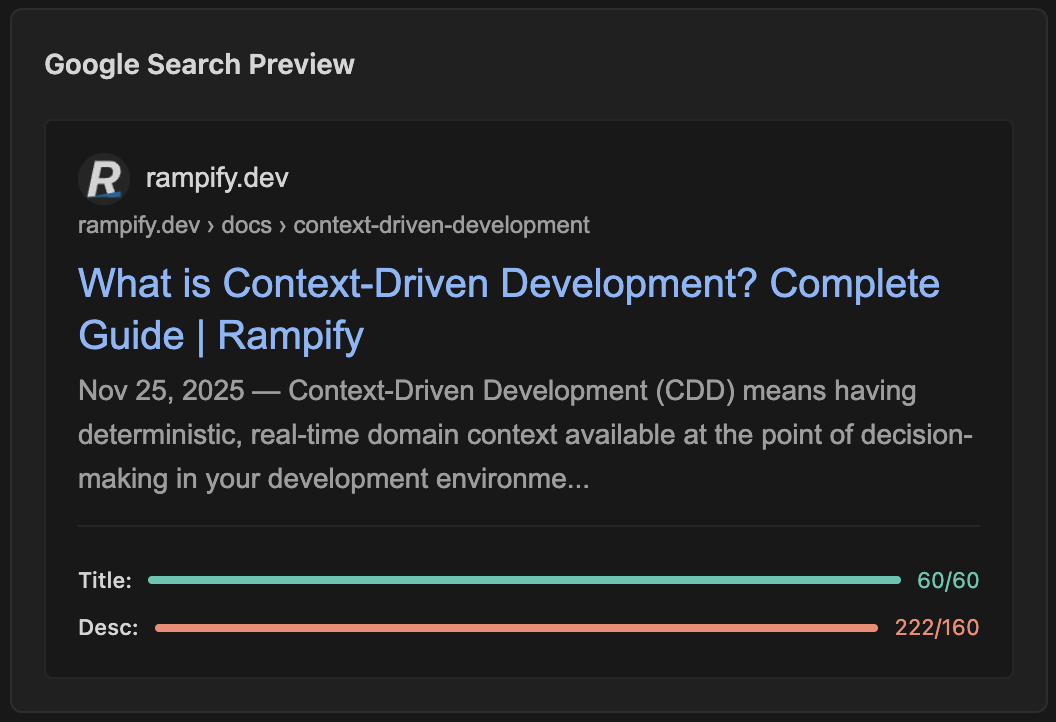
- Live Google Search Preview - See exactly how your page will appear in search results
- Real-Time Validation - Color-coded progress bars for title length, meta descriptions, heading hierarchy, and more
- Framework Support - Works with Next.js, Astro, and Remix
- Rendered HTML Validation - Fetches from your dev server to validate actual output, not just source files
When to Use It#
- Writing blog posts or documentation in MDX/Markdown
- Building content-driven sites with Next.js, Astro, or Remix
- You want instant feedback during the writing process
- You need to catch SEO issues before publishing
Installation#
From VS Code Marketplace:
- Open VS Code or Cursor
- Go to Extensions (Cmd/Ctrl + Shift + X)
- Search for "MDX SEO Validator"
- Click Install
From Command Line:
code --install-extension rampify.mdx-seo-validator
Alternative: Install from VS Code Marketplace
Features#
Validation Checks:
- Title length (30-60 characters)
- Meta description length (150-160 characters)
- Heading hierarchy (H1, H2, H3)
- Word count
- Image alt text
- Internal and external links
- Canonical URLs
- Open Graph tags
Framework Support:
- Next.js App Router with
metadataexports - Astro with frontmatter
- Remix with
metaexports - Any framework using MDX with frontmatter
Performance:
- Vanilla HTML/CSS/JS webview for fast load times
- Real-time updates as you type
- No external API calls required
Configuration#
The extension works out of the box with sensible defaults. Optional configuration:
{
  "mdxSeoValidator.devServerPort": 3000,
  "mdxSeoValidator.framework": "nextjs",
  "mdxSeoValidator.contentDirectory": "app/blog"
}
Screenshots#
Live Google Search Preview - See exactly how your page will appear in Google search results with real-time updates.
Learn More#
Daily SEO Monitor (n8n Workflow)#
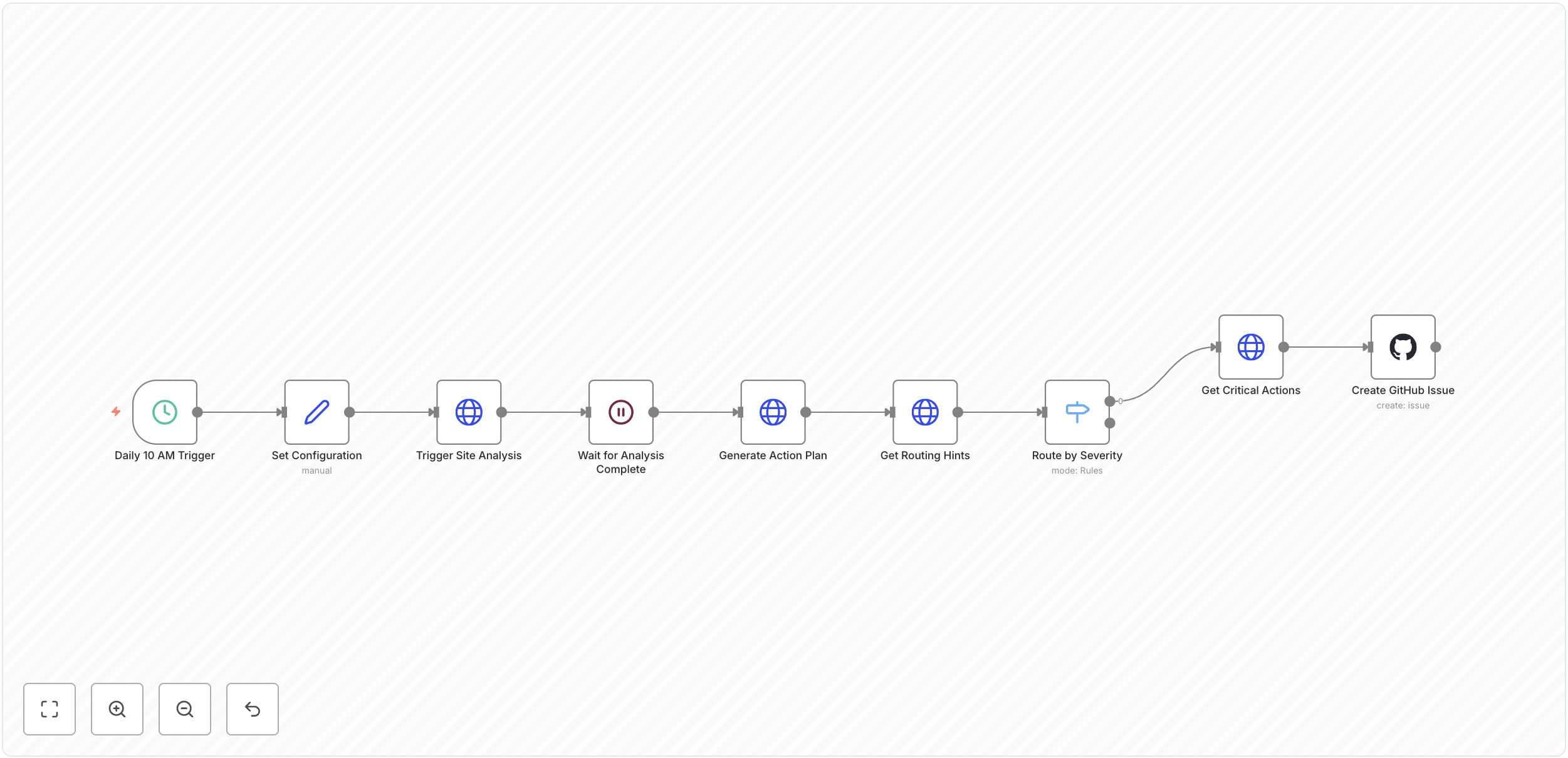
Automated SEO monitoring workflow that runs daily, detects critical issues, and creates GitHub issues with fix instructions.
What It Does#
The Daily SEO Monitor is a no-code workflow for n8n that automates your SEO monitoring:
- Daily Automated Analysis - Runs on schedule (default: 10 AM daily)
- Individual GitHub Issues - Creates one issue per critical problem with fix instructions
- Flexible Notifications - Works with GitHub, Slack, Email, Discord, Teams, and more
- Callback Method - Efficient execution with instant resume when analysis completes
When to Use It#
- You want automated daily site monitoring without manual checks
- Your team uses GitHub for issue tracking
- You need flexible notifications (Slack, Email, Discord, Teams, etc.)
- You prefer no-code workflow automation
- You want to integrate SEO monitoring into your existing dev workflow
Installation#
Prerequisites:
- Rampify account with a site configured
- n8n Cloud or self-hosted n8n
- GitHub account (optional, for issue creation)
Quick Setup:
- Download the workflow from GitHub
- Import into n8n (Click "+" → "Import from File")
- Configure Rampify API credentials (Header Auth with
Authorization: Bearer <key>) - Update client ID in "Set Configuration" node
- Optional: Configure GitHub OAuth for automated issue creation
- Test and activate
Features#
What You Get:
| Feature | Description |
|---|---|
| Scheduled Execution | Daily at 10 AM (customizable via cron) |
| Site Analysis | Comprehensive crawl via Rampify API |
| Issue Detection | Critical problems requiring immediate attention |
| GitHub Integration | One issue per problem with full details |
| Affected URLs | List of all URLs impacted by each issue |
| Fix Instructions | Step-by-step guidance for resolution |
| Priority & Effort | Estimated impact and time to fix |
Example GitHub Issue:
## Fix 2 broken links (404 errors)

Pages returning 404 errors harm user experience and SEO.

**Category:** URL HEALTH
**Priority:** critical
**Effort:** quick
**Affected Count:** 2 page(s)

**Impact:**
Broken links create poor user experience and signal low quality to search engines

**Affected URLs:**
- [https://example.com/page1](https://example.com/page1) (HTTP 404)
- [https://example.com/page2](https://example.com/page2) (HTTP 404)

**How to Fix:**
Either restore the missing pages or add 301 redirects to relevant alternatives
Customization#
Change Schedule:
0 10 * * *    # 10 AM daily (default)
0 9 * * 1     # 9 AM every Monday
0 */6 * * *   # Every 6 hours
Replace Notifications:
The GitHub issue node can be replaced with any n8n integration:
| Integration | Use Case |
|---|---|
| Slack | Team channel notifications |
| SMTP alerts to team inbox | |
| Discord | Developer community alerts |
| Microsoft Teams | Enterprise team notifications |
| Notion | Database tracking |
| Custom Webhook | Any tool with webhook support |
Learn More#
How Tools Complement Rampify#
| Stage | Tool | Purpose |
|---|---|---|
| Before Publishing | MDX SEO Validator | Real-time validation while writing |
| After Publishing | Daily SEO Monitor | Automated monitoring with issue tracking |
| Ongoing | Rampify Platform | Comprehensive site intelligence & GSC integration |
Before You Publish#
MDX SEO Validator provides real-time feedback:
- Validate content as you write
- Catch SEO issues before they go live
- See Google search preview while editing
- Ensure proper heading structure and meta tags
Automate Daily Monitoring#
Daily SEO Monitor workflow automates your SEO checks:
- Runs daily analysis via Rampify API
- Creates individual GitHub issues for critical problems
- Includes fix instructions and affected URLs
- Integrates with your existing workflow (GitHub, Slack, Email, etc.)
Comprehensive Intelligence#
Rampify Platform provides deep site insights:
- Complete site crawls and issue detection
- Google Search Console integration (indexing, queries, performance)
- Content recommendations from actual search data
- MCP tools for IDE integration
- Historical tracking and trends
Example Workflow#
- Write - Use MDX SEO Validator to validate content while writing
- Publish - Deploy your site to production
- Automate - Daily SEO Monitor creates GitHub issues for critical problems
- Monitor - Rampify platform tracks indexing status and search performance
- Optimize - Use Rampify's MCP tools to generate fixes in your IDE
- Repeat - Continue writing with real-time validation
Coming Soon#
We're building more free, open-source tools for developers:
| Tool | Type | Status |
|---|---|---|
| Link Checker | CLI | Planned |
| Sitemap Validator | CLI | Planned |
| Performance Monitor | n8n Workflow | Planned |
Have an idea for a tool? Let us know!
Note: Schema generation and meta tag generation are already available via Rampify's MCP Server.